
Local-first keeps sensitive prompts and provider keys on your machine while preserving a fast, dependable workflow.
LLM API client & model evals · macOS
Test LLM APIs and compare models on your Mac.
Compose a real chat request, run it across models, and score the results in one local-first workspace. No account or hosted proxy — your keys stay on your Mac.
Free and open source, signed and notarized. Prefer automatic updates? Get it on the Mac App Store for $0.99.
macOS 12 Monterey or laterApple Silicon & IntelEnglish & Traditional Chinese UINo account required
AssistantGPT-5.4 mini
Test LLM APIs. Compare models. Ship with evidence.
OpenAIAnthropicGoogle GeminiOpenRouterOpenAI-compatible endpointsAnthropic-compatible endpoints
Built-in model evals
Stop comparing model output in separate tabs.
Vendor playgrounds and one-off curls make unfair bake-offs. Start from a real request, add the models you want to test, and run them together. Roshi keeps the prompt, parameters, output, and metrics aligned so you can pick a model with evidence.
- 01Run models in parallelStream every response as it arrives.
- 02Compare side by sideReview output
- 03Score what mattersRate manually or use a judge model and custom rubric.
- 04Keep the evidenceSave runs in folders and export JSON or CSV.
See the multi-model comparison workflow and LLM-as-a-judge guide.
User
Explain why local-first matters in one useful sentence.
Local-first gives you ownership of your data and tools, so privacy never depends on someone else’s server.
Local-first software keeps your work private, available offline, and under your control.
RubricHelpfulAccurateClearWinner: Claude Sonnet · 9.4
One focused workspace
Everything you need between “does this call work?” and “which model ships?”
01
Compare models in parallel
Send one frozen prompt to several providers at once, then review every response and metric side by side.
02
Score with an LLM judge
Pick a judge model and write a rubric so “which answer is better?” becomes a repeatable score, not vibes.
03
Talk to any provider
OpenAI, Anthropic, Gemini, OpenRouter, plus OpenAI-, Anthropic-, or Gemini-compatible endpoints — one workspace.
04
Inspect the full response
Streamed text, raw bodies, headers, latency, token usage, and Node/Python/cURL you can paste into code.
05
Organize it your way
Use collections, environments, history, and saved eval runs in English or Traditional Chinese. Roshi follows your system language, or you can switch it in Settings.
06
Stay local and private
No Roshi account or hosted relay. Keys, settings, requests, and results stay on your Mac.
Inside Roshi
One continuous path from request to decision.
Compose, evaluate, and choose without stitching together playgrounds and scripts.
01
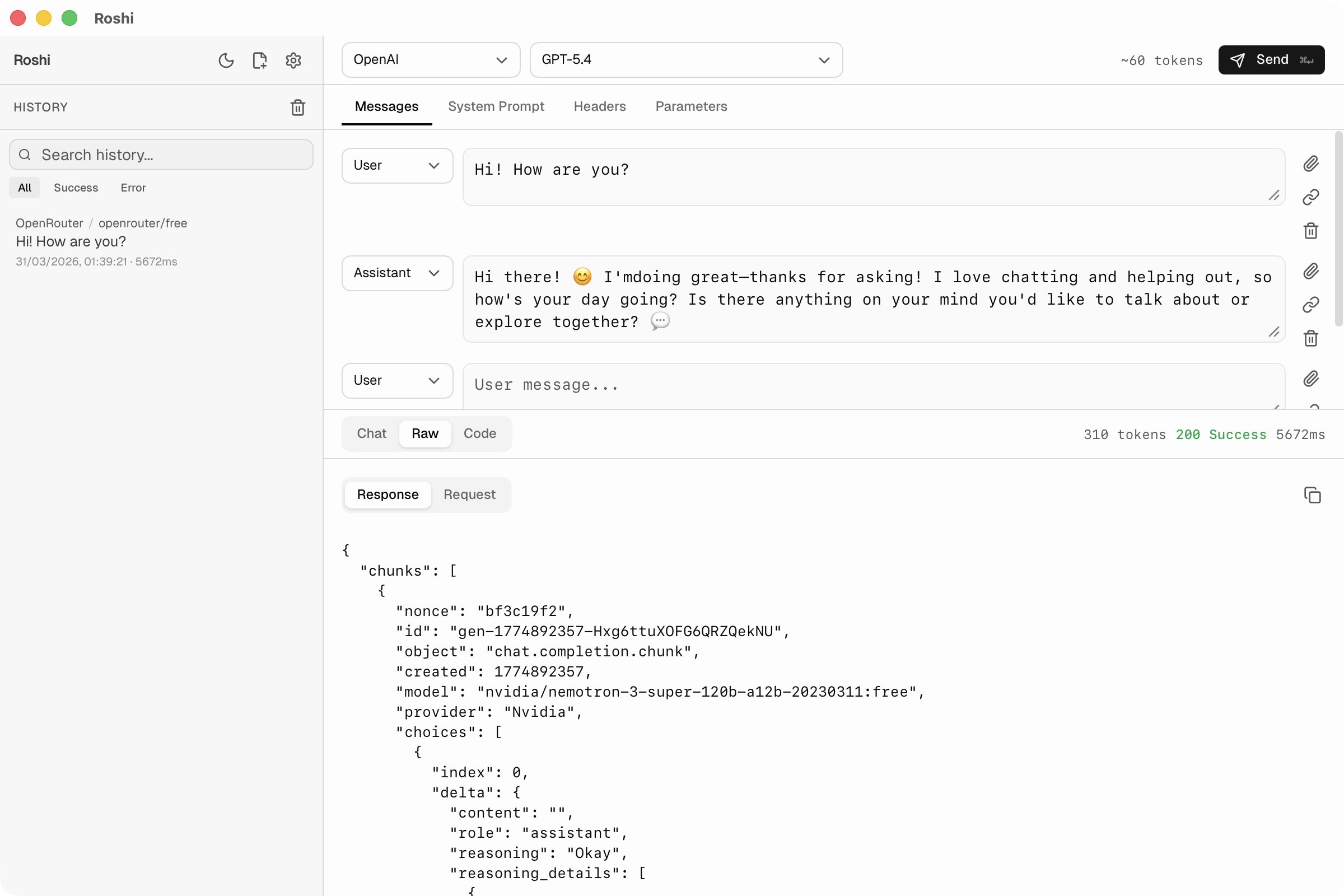
Compose & inspect
Build the exact request you mean to test.
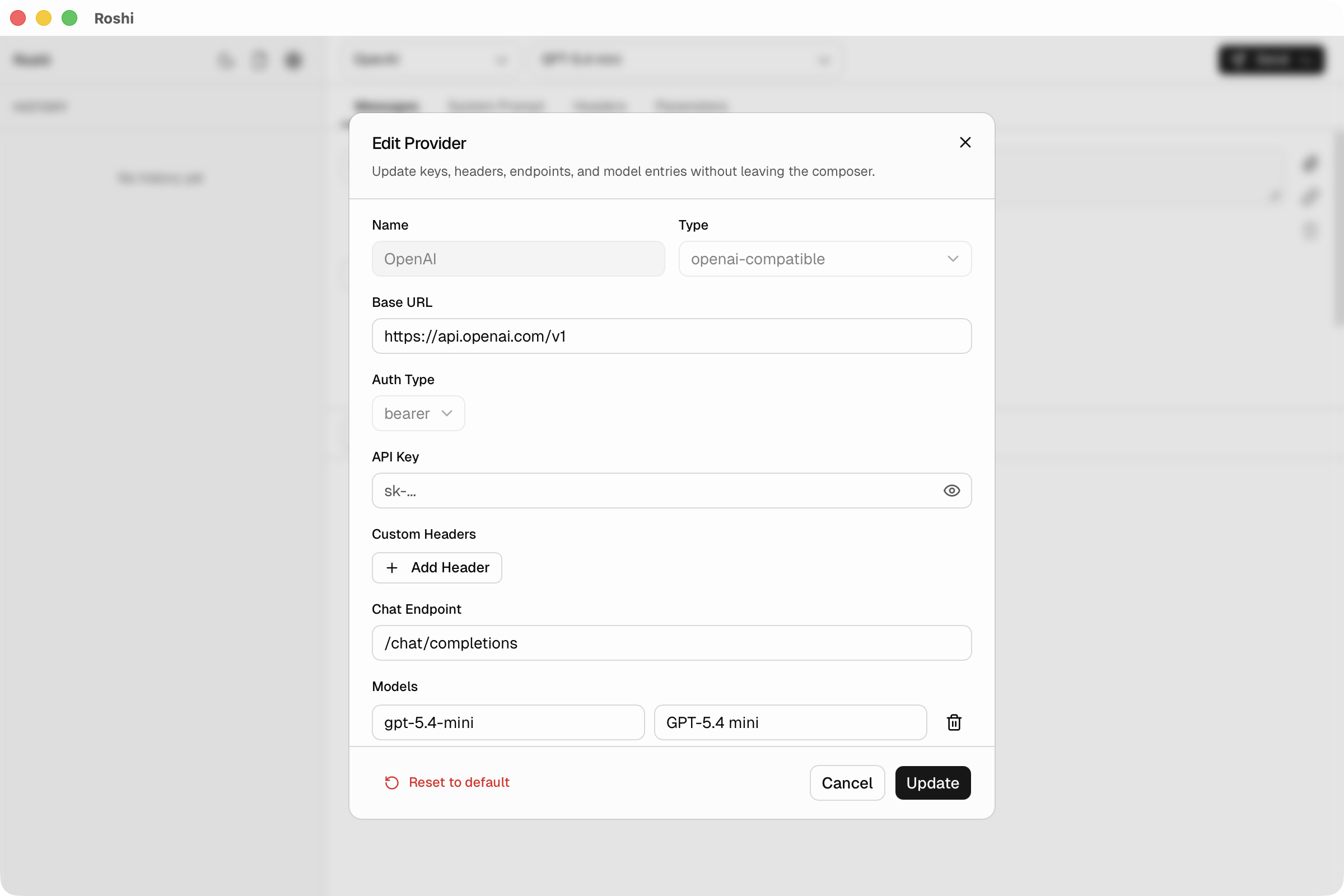
Work with multi-turn messages, system prompts, parameters, headers, and compatible endpoints in one focused client. Stream the answer, then inspect the raw response without changing tools.
02
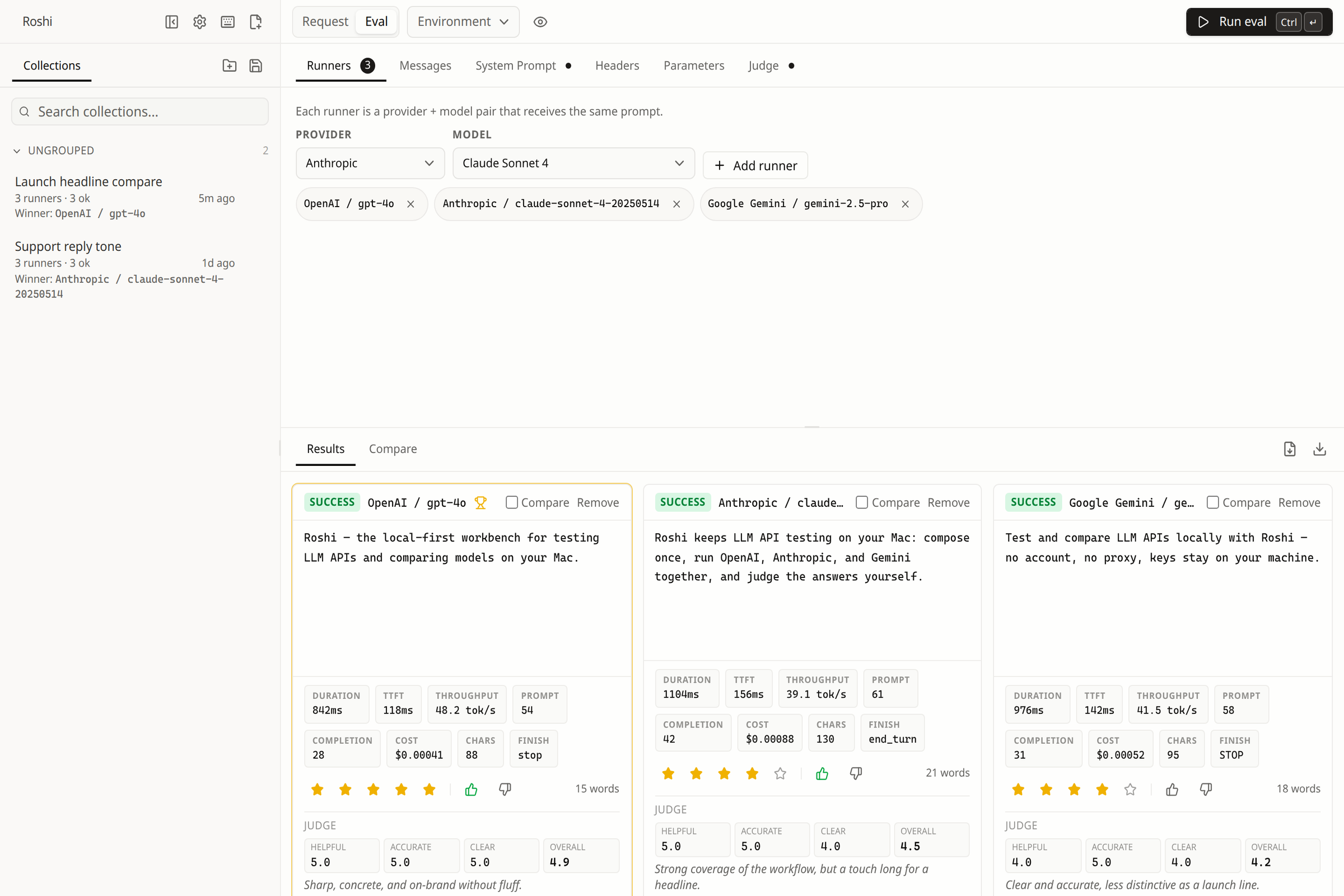
Run together
Give every model the same starting line.
Choose the providers you already use and fan one frozen request across them in parallel. Roshi keeps output, latency, tokens, and cost aligned for a fair comparison.
03
Decide with evidence
Move from different answers to a defensible choice.
Compare any two responses word by word, inspect performance metrics, then score candidates manually or with a separate judge model and your own rubric.
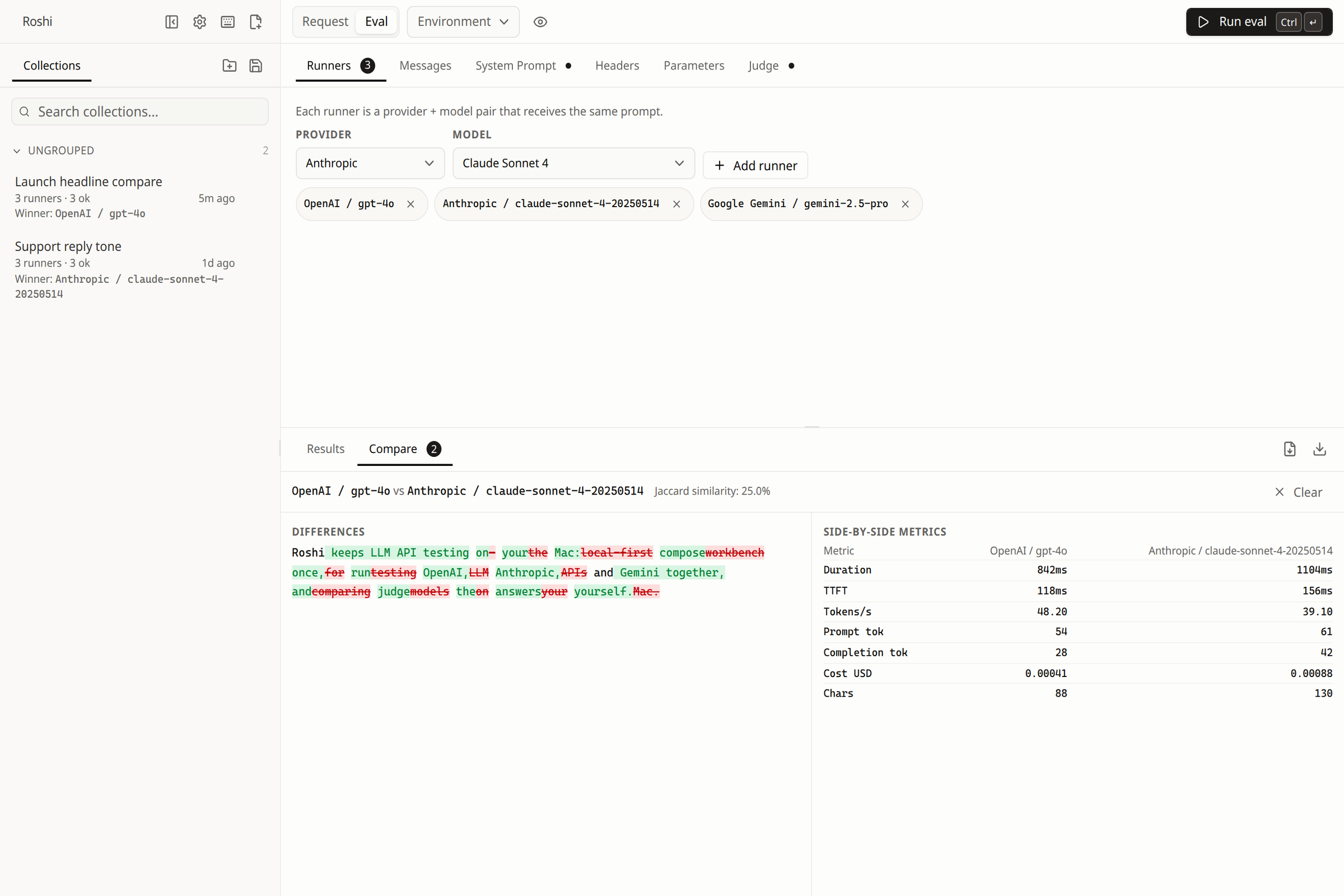
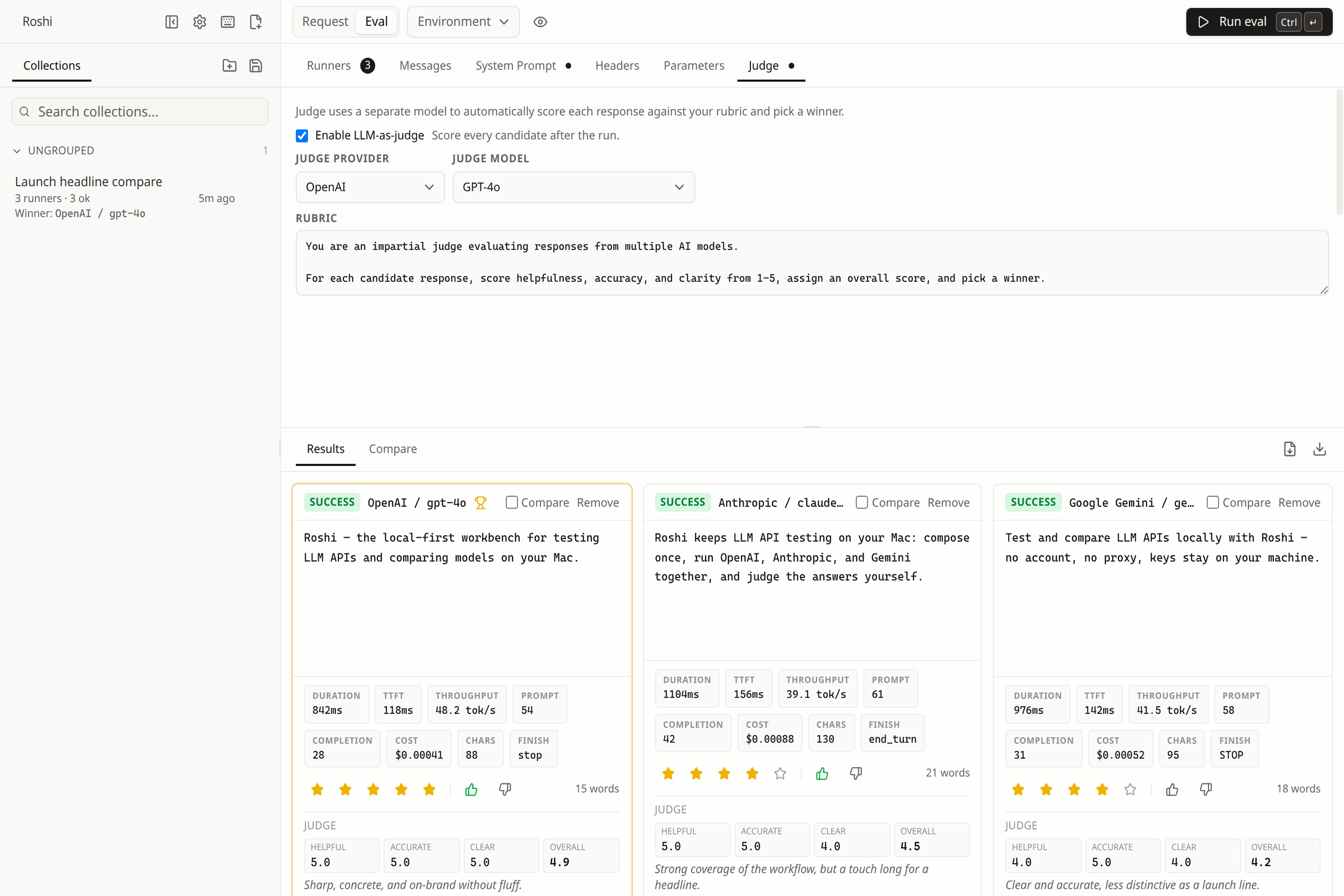
Workflow
From API key to a model you can ship.
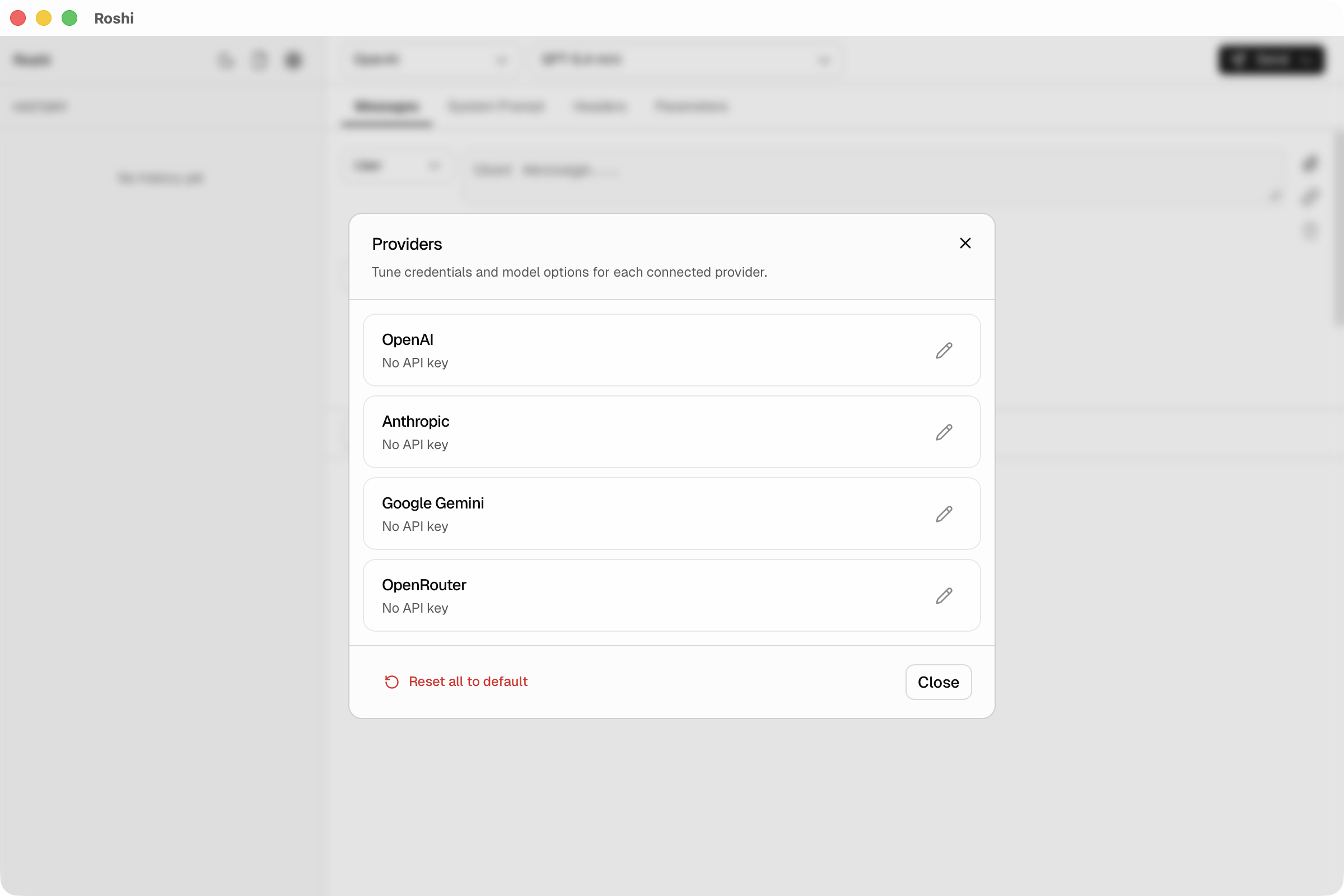
Add a provider
Paste an API key into a built-in template
Compose and debug
Edit messages
Compare models
Fan the same request across models
Save and ship
Save the run
Comparison
Know Postman? Here’s what Roshi adds for LLM APIs.
| Comparison | Roshi | cURL / CLI | Postman | Promptfoo |
|---|---|---|---|---|
| Built-in cross-model evals | ✓ | — | — | ✓ |
| Built-in LLM judge | ✓ | — | — | ✓ |
| Live streaming | ✓ | ✓ | — | — |
| Multi-provider | ✓ | ✓ | ✓ | ✓ |
| Local history | ✓ | — | ✓ | — |
| No account required | ✓ | ✓ | — | ✓ |
| Code generation | ✓ | — | ✓ | — |
| LLM-specific UI | ✓ | — | — | — |
| Keys stay local | ✓ | ✓ | — | ✓ |
| Open source | ✓ | ✓ | — | ✓ |
Longer write-ups: Roshi vs Promptfoo, Roshi vs Postman for LLM APIs, LLM evals on macOS, and the rest of the guides.
Security
Your keys never leave your machine.
Roshi is client-only. There is no account, no hosted relay, and nothing of ours in your provider traffic — requests go from your Mac straight to the provider over a restrictive Content-Security-Policy. Keys stay in the app’s local database on your Mac; see the security model for details.
What you can verify
- notarizationnotarized by Apple in CI
- sandboxApp Store build is sandboxed
- updatesApp Store auto · GitHub manual
- key storagelocal on your Mac
- telemetrynone in the app
- licenseMIT, v2.4.0
Check the signature on any build you download:
spctl -a -vvv -t install /Applications/Roshi.appDownload
The full app, either way.
Both builds come from the same MIT-licensed source with every feature unlocked. The only difference is how updates reach you.
Direct Download
Free
Signed and notarized .dmg builds straight from GitHub Releases.
- Every feature, no usage limits
- Apple Silicon and Intel builds
- Runs outside the App Sandbox
- Manual updates — grab the next release yourself
- Build it from source if you prefer
Mac App Store
$0.99one-time purchase
The same app, delivered and kept current by Apple.
- Everything in the direct download
- Automatic updates through the App Store
- Runs in Apple's App Sandbox
- Installs on every Mac tied to your Apple Account
- Pays for continued development
Not sure which? Take the free download if you want the unsandboxed build or plan to contribute; take the App Store one if you would rather not think about updating again. Paying for it is a way to fund the work, not a way to unlock features.
FAQ
Common questions.
What is Roshi?
Roshi is a local-first macOS app for developers who call LLM APIs. Think of it as an API client shaped for chat completions: compose multi-turn requests, stream responses, inspect headers and tokens, then run the same prompt across models to compare and score them. If you already use Postman for REST, Roshi is the specialist tool for the model layer.
Is Roshi a replacement for Postman?
No. Keep Postman (or Insomnia, Bruno, and similar) for REST, GraphQL, and non-LLM services. Use Roshi when the payload is chat completions or messages and you care about streaming, provider templates, multi-model comparison, and LLM-as-a-judge.
Does Roshi proxy requests through a backend?
No. Roshi is client-only. Your Mac talks directly to the provider. Secrets are stored locally.
Which providers are supported?
OpenAI, Anthropic, Google Gemini, and OpenRouter out of the box. You can also add any OpenAI-compatible, Anthropic-compatible, or Gemini-compatible endpoint.
Does it support streaming and multi-turn chats?
Yes. Streaming responses are first-class, and the composer supports multi-turn conversations with role-based messages.
Which interface languages does Roshi support?
Roshi supports English and Traditional Chinese. It starts with your system language, and you can switch languages at any time in Settings.
How do Roshi evals work?
Start from a request you already trust, choose multiple provider and model runners, and run them in parallel. Compare output and metrics side by side, rate results manually, or use another model as a judge with your own rubric.
Can I save and export eval results?
Yes. Save named eval runs in folders, reload them later, and export the full results as JSON or a metrics-rich CSV.
Where are my requests and eval results stored?
Roshi stores provider settings, request history, drafts, collections, environments, and saved eval runs locally on your machine. There is no hosted backend or account system.
How are my API keys stored?
In the app’s local database on your Mac, protected by your macOS user account. Roshi has no backend, so keys never leave your machine. The security model in the repository explains it in full.
Read the security model →Is the download signed and notarized?
Yes. Release builds are signed with a Developer ID certificate and notarized by Apple as part of the release workflow, so Gatekeeper opens them without a warning. You can confirm it yourself by running spctl against the installed app.
How do updates work?
The Mac App Store build updates automatically through the App Store. The free GitHub build has no auto-updater, so you update by downloading the next release — watch the repository or the changelog to hear about one.
See the changelog →Can I generate code from a request?
Yes. Roshi generates Node.js and Python snippets from the request you have validated in the UI.
What is the difference between the free download and the Mac App Store version?
They are built from the same MIT-licensed source and have identical features. The free GitHub build is signed with a Developer ID certificate and notarized by Apple, runs outside the App Sandbox, and you update it by downloading the next release. The $0.99 Mac App Store build runs in Apple’s App Sandbox, updates automatically, and funds continued development.
What are the system requirements?
Roshi runs on macOS 12 (Monterey) and later, including both Apple Silicon and Intel Macs.
Is Roshi available on Windows or Linux?
Not yet. Windows and Linux support are on the roadmap.
Let us know you want it →What license is Roshi released under?
Roshi is released under the MIT License. You can use, modify, and distribute it freely.
Stop guessing which model to ship.
Add your provider keys, compose a real chat request, and compare the models that could go to production — on your Mac, with no Roshi account.